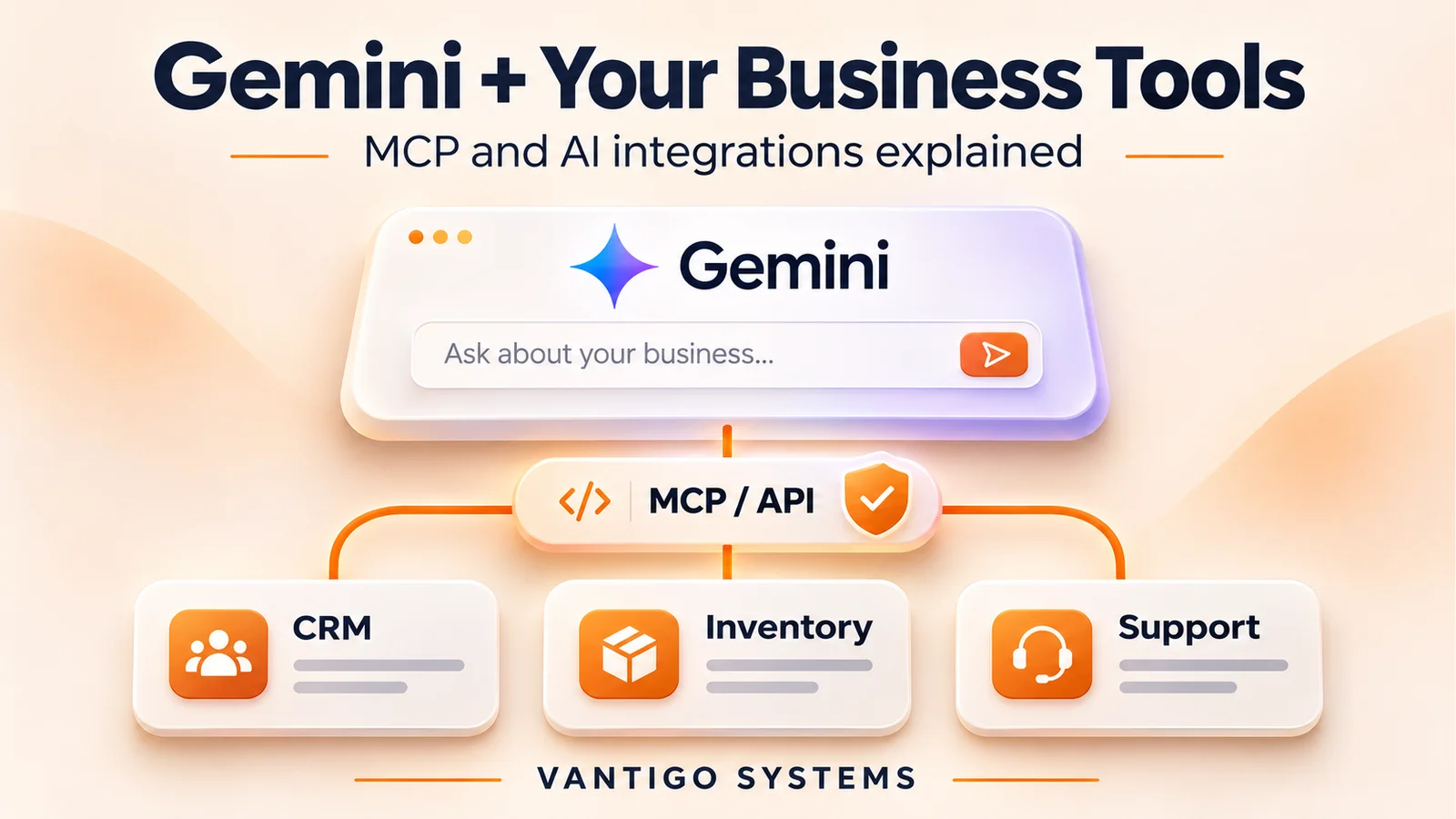
Gemini MCP integrations can give an AI assistant controlled access to business tools, such as a CRM or an order system. The useful part is being able to work with current records instead of asking someone to paste information into a chat.
On 10 November 2026, Google Cloud published an update about its Gemini factory initiative for software partners. It describes ways to bring partner capabilities into Gemini using connectors, skills, plugins and agents. For a business owner, the practical question is where those connections could help your team and what they should be allowed to do.
This guide explains the announcement, then walks through an illustrative enquiry workflow. We have reviewed the public documentation. We have not tested a Gemini factory deployment or measured customer results.
What Google announced about Gemini factory
Google presents Gemini factory as a programme where its specialists work with software partners on enterprise integrations. The architecture includes MCP connectors for access to tools and data, skills for instructions, plugins for packaging capabilities, and A2A agents for separate agent runtimes. Read the Google Cloud update on Gemini factory for the announcement.
This is a partner integration story. It does not mean every personal Gemini account can now connect to every business application. Before planning a project, confirm the Gemini product, supported connection method and account access that your team would need.
What is an MCP integration in plain English?
Model Context Protocol, or MCP, provides a common way for AI applications to communicate with external systems. An MCP server can make specific tools available to an assistant. A tool might look up a customer record, search approved documents or create a draft support ticket.
The underlying business application still needs a way to perform that work. An MCP layer often calls an existing API, which is the interface software uses to exchange data and requests. A connector cannot supply reliable stock information if the inventory system has no reliable stock record.
The official MCP architecture overview explains the host, client and server relationship. For a business brief, a simpler description is enough: name the information the assistant can read and the actions it can request.
For a first pilot, give the assistant a narrow job and make every change visible to the person responsible for it.
Vantigo Systems, implementation recommendation
MCP, APIs, skills and agents do different jobs
These terms appear together, but they describe different parts of an integration. You do not have to buy a separate system for each one.
- An API exposes an operation in your software, such as finding an order by its reference.
- An MCP connector makes selected capabilities available through the MCP protocol to a compatible AI application.
- A skill gives instructions for a task, such as which fields a useful enquiry summary should contain. Instructions do not replace access controls in your application.
- An agent works through a task using the tools available to it. The integration still needs limits on its actions and a way to handle failures.
Choose the approach after defining the job. A form that always creates the same CRM record may only need an API or webhook. Adding an AI model to that fixed step introduces another component to maintain.
A practical example: preparing a website enquiry for follow-up
Consider a service company receiving enquiries through its website. Its sales team needs a readable summary, an existing-contact check and a reminder to follow up. The following is a proposed workflow, not a claim that Google supplies this exact setup.
Start with the original enquiry
Keep the submitted message and consent information in the system that receives the form. The assistant can prepare a short summary and highlight missing details, such as a project deadline. It should leave an uncertain budget marked as unknown rather than guess one.
Check the CRM before creating another contact
Provide a narrowly scoped lookup tool. It might search using an email address and return only the fields needed for the task. If the lookup fails or produces several matches, route the enquiry for review. Treating every failed search as a new customer would create duplicates.
Ask a person to approve the next action
Show the original message beside the proposed summary, contact match and follow-up task. An employee can correct the details before anything is written back. Sending a reply to the prospect should be a separate permission from preparing its draft.
Record what happened
Store the enquiry reference, approved action and final result. If a request times out, check whether the task already exists before retrying. Otherwise one enquiry can produce several reminders.
Our website enquiry and lead management guide covers the human process behind these steps. Define who owns follow-up before connecting an assistant to it.
Where else could a business use connected AI?
Customer support: let an assistant retrieve an order status and suggest a response from approved policy documents. Refunds and account changes need their own rules and approval steps.
Inventory questions: retrieve availability from the live inventory system. Include the source and retrieval time where they matter. Product reservations should go through the normal stock controls.
Internal project updates: prepare a summary from assigned tasks and approved notes. Check that staff cannot retrieve a different client’s private project just by asking for it.
These are possible implementation patterns. Availability depends on the applications, permissions and supported APIs involved.
What to check before connecting private business data
Google’s Gemini Enterprise custom MCP documentation describes administrator configuration, HTTPS endpoints, authentication and enabling actions. Those setup requirements deserve a technical review before you promise a working connection.
For the project itself, ask these questions:
- Which records can each user access? Enforce that boundary in the connected system. A prompt asking the model to respect privacy is insufficient.
- Which tools can change data? Separate reading, drafting, updating and deleting. Start with reading or drafts where that meets the need.
- Where does information go? Review the applicable product terms, processing arrangements and retention settings. Avoid sending fields the task does not need.
- What happens with hostile or misleading content? Treat text in emails, documents and tickets as input data. It must not grant the assistant new permissions.
- Who can stop the workflow? Assign an owner who can disable a tool, revoke access and review errors.
Test with sample records first. Include an employee who should be denied access, an unavailable API and an enquiry missing key details. A polished demonstration with one successful request tells you little about those cases.
When a webhook or ordinary automation is enough
If your rule is “send every completed form to the CRM and assign it to the sales queue,” start with a direct integration. The inputs and action are already defined.
AI becomes worth evaluating when the task involves interpreting varied messages, finding relevant information or preparing a draft that a person would otherwise assemble. Even then, keep predictable checks in code. Required fields, duplicate prevention and permission checks should not depend on a model’s judgement.
Vantigo’s third-party integration service covers connections between business systems. A brief for that work can identify which steps need interpretation and which should remain fixed rules.
A sensible first pilot and what to measure
Pick one workflow with a named owner and a clear review step. Write down the current process before building anything. Then test the proposed version against the same sample tasks.
- Define the request, permitted sources and expected output.
- Check account eligibility, API access and ongoing costs.
- Build a limited connection using test records.
- Review correct results, mistakes and denied requests.
- Agree how to monitor failures before introducing real users.
Measure staff corrections, duplicate records, task completion and time spent reviewing each result. Include model usage, hosting, software subscriptions and maintenance when assessing cost. Set a target from your own baseline; a vendor announcement cannot predict your savings.
Frequently asked questions
Is Gemini factory a new app I can install?
Google describes it as an initiative for building partner solutions. The announcement is not an installation guide for a standalone small-business app.
Can I connect Gemini to my existing CRM?
Possibly. Check the specific Gemini product and CRM, available connectors, authentication and permitted actions. Some projects can use an existing connection; others need custom API work.
Does MCP replace the APIs in our software?
Usually the integration still uses those APIs underneath. MCP provides a standard interface to compatible AI applications; the business logic and permissions remain important.
Do we have to move our website to Google Cloud?
A website migration should not be assumed. Review where the website, connector and business data need to run as separate decisions. The right arrangement depends on the chosen products and network requirements.
Can an assistant automatically update records or email customers?
Only if the implemented tools and permissions allow those actions. Our recommendation for an initial pilot is to prepare drafts and require approval for customer-facing changes.
How much would a custom integration cost?
The scope depends on the systems involved, data access, actions and testing requirements. A read-only lookup and a workflow that writes to several systems need different estimates. Share one representative task before requesting a quote.
Plan one useful connection before building more
Google’s update is a useful reason to review where an assistant could help your team. Start by choosing a specific task that depends on information in your existing software.
Vantigo Systems provides AI integration development and AI workflow automation. Send us the applications you use, the action you want to support and who should approve it. We can review the scope and discuss a practical implementation.
Discuss your business integration
Editorial note: Written on 11 November 2026 using the linked Google Cloud and MCP sources. Product access and configuration requirements can change. Vantigo Systems is not claiming Google partnership or certification.
Plan My Project